
Notion’s pricing page makes every plan look essential. The truth is simpler: the Free plan is genuinely excellent for individuals, Plus exists for one very specific reason, and Business is for teams that have outgrown spreadsheet-style permissions. This guide tells you exactly which line you fall on, and when the upgrade is worth real money.
Disclosure: some links below are affiliate links. If you purchase through them we may earn a commission at no extra cost to you, it never affects our picks. How we review.
Quick answer: Notion Plus is our top pick (best all-around for small teams), with Notion Free the smart budget buy. Full scores, trade-offs and who each pick is not for, below.
Quick Comparison
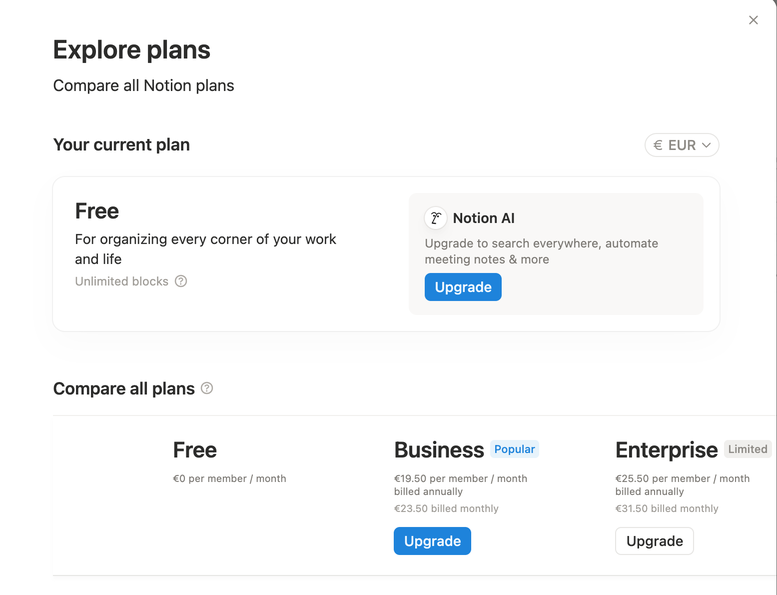
| Plan | Price (billed annually) | Best for | The real limit |
|---|---|---|---|
| Notion Free | $0 | Individuals, personal systems | 7-day page history, 10 guest limit, blocks cap only when collaborating |
| Notion Plus | ~$10/user/month | Small teams, unlimited uploads | Permissions stay basic |
| Notion Business | ~$15-20/user/month | Growing companies | Price scales fast with headcount |
Prices approximate, check Notion’s pricing page for current figures and regional currency.
BrightFlow Scorecards
Our independent assessment, a weighted rubric (Performance 40%, Ease of use 20%, Features 20%, Value 20%). Scored out of 10.
Notion Free: Best free pick for individuals
If you’re one person building a second brain, a job-search tracker, a content calendar, or a personal wiki: stop reading and use the Free plan. You get unlimited pages and blocks for personal use, the full database feature set, synced blocks, and API access. The limits that matter, page history capped at 7 days and a 10-guest ceiling, simply don’t bite most solo users.
Who it’s not for: anyone whose Notion is load-bearing for a team. The moment two of you edit the same workspace daily, the Free plan’s collaboration block cap becomes a real wall.
Notion Plus: Best all-around for small teams
Plus is the “we actually work in here” plan. Unlimited blocks for teams, unlimited file uploads (Free caps files at 5 MB, the limit you’ll actually hit first), 30-day page history, and up to 100 guests. For a 2–5 person team running projects, docs and a lightweight CRM in one place, roughly ten dollars per person is cheap for what it replaces.
Who it’s not for: solo users who feel vaguely guilty using free software. Guilt is not a business case, stay on Free until you hit a wall with a name.
Notion Business: Best for larger teams
Business adds the things ops and IT people ask about: SAML single sign-on, private teamspaces, PDF export of whole workspaces, and 90-day page history. New in recent updates, most Business tiers also bundle Notion AI, which changes the math if your team was paying for the AI add-on anyway.
Who it’s not for: teams under ~10 people without compliance requirements. You’d be paying for admin features nobody uses.
What about Notion AI?
Notion AI writes, summarizes and autofills databases inside your workspace. Bundled into Business-and-up plans, it’s a genuine bonus. As a paid add-on on Free or Plus, it’s worth it only if you already reach for AI while writing, if you have a ChatGPT or Claude subscription you actually use, you can skip it without missing much.
The honest decision path
Solo → Free, no caveats. Small team hitting the file-size or history limits → Plus. Need SSO, serious permissions, or bundled AI at scale → Business. Still torn between Notion and its rivals? Our Notion vs ClickUp vs Asana comparison settles the “which tool” question, and our solopreneur software guide shows where Notion fits in a one-person stack.
FAQ
Is Notion’s Free plan really free forever?
Yes. It’s a genuine free tier, not a trial, unlimited pages and blocks for individual use, with paid plans existing for team collaboration and admin features.
Can I downgrade from Plus back to Free?
Yes, at any time. Your content stays; you just lose the paid limits (longer history, unlimited team blocks, big file uploads) going forward.
Does Notion offer discounts?
Annual billing is roughly 20% cheaper than monthly, students and educators get Plus features free with an academic email, and startups can often get credits through Notion’s startup program.
Is Notion AI included in the price?
On newer Business and Enterprise plans it’s typically bundled. On Free and Plus it’s a paid add-on per member, worth it mainly if AI-assisted writing is already part of your workflow.