Category: Comparisons

  • Cal.com Review: The Free Plan Without a Catch (Tested Take)

    Cal.com Review: The Free Plan Without a Catch (Tested Take)

    Cal.com is the scheduling tool we recommend most often, and this review is the long-form why: what the free plan genuinely includes, where it beats Calendly and where it does not, and who should skip it. We use scheduling links daily and have covered this category across our tools comparison and the alternatives guide; this is the deep dive on our top pick.

    Disclosure: some links below are affiliate links. If you purchase through them we may earn a commission at no extra cost to you. This doesn’t affect our rankings.

    Quick answer: Cal.com earns our recommendation on one structural fact: the free individual plan has no meaningful limits (unlimited event types included), backed by an open-source engine. Setup costs a few more minutes than Calendly; the booking experience ends up equivalent. New users get 20 percent off paid tiers for a year through our link.

    What Cal.com Is

    A scheduling platform in the Calendly mold: you connect calendars, define event types with availability rules and buffers, and share booking links that let people grab a slot without email ping-pong. The difference is structural rather than cosmetic: Cal.com’s engine is open source, self-hostable, and API-first, which shapes everything from pricing to who adopts it.

    The Free Plan, Honestly Audited

    The individual free tier includes unlimited event types (Calendly free allows one), multiple calendar connections, customizable booking pages, buffers and limits, and the integrations that matter for solo use, including video call links. In months of category coverage we have not found the catch; the business model monetizes teams and the platform, not individuals. For a solo professional the honest summary is: this is the whole product, free.

    Where It Beats Calendly

    Price at every tier: free does more, paid costs less per seat. Openness: self-hosting and full data control are real options, not marketing. No pricing-page ambushes: the open core keeps the incentives honest. Extensibility: routing forms, workflows and an API that products actually build on.

    Where Calendly Still Wins

    Onboarding smoothness: Calendly remains the gentler first hour. Ecosystem maturity: some niche integrations arrive on Calendly first. Enterprise admin polish: large teams with heavy routing needs may prefer the incumbent’s tooling. None of these change the individual calculus; all can matter at organization scale, which we covered in the comparison.

    Setup: The Honest Fifteen Minutes

    We wrote the full walkthrough separately: zero to first booking in 15 minutes.

    Connect calendar, create first event type, set availability, test-book yourself, install the link in your email signature. The extra friction versus Calendly is real but front-loaded and small; nothing about daily use is harder. The 20-percent-off-for-a-year through Cal.com applies if you later want paid features; the free plan needs no discount.

    Verdict

    For individuals and small operations, Cal.com is the rare recommendation without an asterisk: the best free plan in the category, honest structural advantages, and trade-offs that are front-loaded minutes rather than ongoing costs. Teams deep in Calendly can stay without regret; everyone starting fresh should start here. It also pairs naturally with the rest of a lean stack, see our five-tool system and the meeting assistants guide.

    FAQ

    Is Cal.com really free for individuals?

    Yes. The individual plan includes unlimited event types, calendar connections and the core booking features at no cost. Paid tiers exist for teams, organizations and the enterprise platform; solo users can run indefinitely on free.

    Is Cal.com hard to set up compared to Calendly?

    Slightly. Expect an extra few minutes on setup and marginally less hand-holding. Once configured, the day-to-day booking experience is equivalent for you and indistinguishable for the people booking you.

    Can I move from Calendly to Cal.com without losing bookings?

    Existing scheduled meetings stay on your calendar regardless, since they live there, not in the tool. You recreate your event types in Cal.com, swap the link in your signatures and pages, and retire the old link at your pace.

    Is self-hosting Cal.com worth it?

    For individuals, no; the hosted free plan gives you the open-source project’s benefits without operations work. Self-hosting earns its keep for privacy-sensitive teams, data-residency requirements, or products embedding scheduling.


  • Best Calendly Alternatives: Free, Open Source and One-Time-Price Options

    Best Calendly Alternatives: Free, Open Source and One-Time-Price Options

    Calendly invented the category and still sets the polish bar, but its pricing model has a way of growing with you: one event type on the free plan, then per-seat fees that sting once a team adopts it. The alternatives have matured enough that most people paying for Calendly today could pay less, or nothing, without their booking experience getting worse. Here is the honest map.

    Disclosure: some links below are affiliate links. If you purchase through them we may earn a commission at no extra cost to you. This doesn’t affect our rankings.

    Quick answer: For most individuals, Cal.com is the strongest Calendly alternative: unlimited event types on a genuinely free plan, open source underneath, and 20 percent off paid tiers for a year through our link. Google users should try the built-in appointment schedules first. Budget one-time buyers: TidyCal.

    Quick Comparison

    Tool Free plan Paid from Standout Best for
    Cal.com Unlimited event types Team tiers Open source, API-first Most switchers
    Google appointment schedules Built into Calendar Included in Workspace Zero new accounts Google-first users
    TidyCal Limited One-time lifetime price No subscription at all Budget solo users
    SavvyCal Trial Monthly Overlay your calendar on theirs Scheduling-heavy pros
    Zoho Bookings Basic Low monthly Deep Zoho suite integration Zoho shops

    Cal.com: The Open-Source Heir Apparent

    Cal.com does the core Calendly job, booking pages, calendar sync, buffers, round-robin, with two structural advantages. First, the free individual plan includes unlimited event types, which is exactly the limit that pushes Calendly users to pay. Second, it is open source: self-hostable for teams with data requirements, embeddable for products, and immune to the pricing-page surprises that closed tools spring on loyal users.

    The honest trade-offs: onboarding is a notch less hand-held (our setup guide closes that gap), than Calendly’s, and some niche integrations arrive later. In day-to-day booking, your clients will not notice a difference. Signing up through our link gives new users 20 percent off paid plans for a year; the free plan needs no discount because it is simply free.

    Who should skip it: teams deeply wired into Calendly’s admin tooling and routing rules, where migration cost outweighs subscription savings.

    Google Calendar Appointment Schedules: Try Free-and-Already-There First

    If your scheduling needs are office hours, tutoring slots or straightforward client calls, the booking page built into Google Calendar may end the search before it starts. No new account, no new tab, bookings land directly on the calendar you already check. It is genuinely basic: minimal customization, no payments, no routing. But basic-and-adopted beats powerful-and-abandoned, and the price is zero. We covered it alongside the paid options in our scheduling tools comparison.

    TidyCal: The Subscription Objector

    TidyCal’s pitch is a one-time payment for lifetime access, aimed squarely at people tired of adding monthly software fees. It covers the essentials, booking pages, integrations, payments, with less polish and a smaller ecosystem than the big two. For a solo operator doing a handful of bookings a week, that trade is often rational. Do the math against Calendly’s annual cost and it usually pays for itself within the year.

    SavvyCal: For People Who Schedule All Day

    SavvyCal’s signature feature lets recipients overlay their own calendar on top of yours when picking a slot, which meaningfully reduces the back-and-forth for scheduling-heavy roles: recruiters, salespeople, consultants. It is a paid product priced like Calendly, so it is not a savings play; it is a workflow upgrade for people whose day is meetings.

    Zoho Bookings: The Suite Play

    If your business already runs Zoho CRM, mail or invoicing, Zoho Bookings slots in natively and costs less than Calendly’s equivalent tiers. Outside the Zoho ecosystem its case weakens; inside it, keeping scheduling data next to your CRM is the point.

    How to Choose in 60 Seconds

    Individual, want the most for free: Cal.com (our review). Everything-Google household with simple needs: appointment schedules. Allergic to subscriptions: TidyCal. Your calendar IS your job: SavvyCal. Zoho shop: Zoho Bookings. Scheduling links pair naturally with a meeting stack, our AI meeting assistants guide covers the other half, and solo operators comparing whole toolkits should see software for solopreneurs.

    FAQ

    What is the best free Calendly alternative?

    Cal.com’s free individual plan is the most complete: unlimited event types where Calendly’s free tier allows one, plus workflows and integrations that Calendly reserves for paid plans. Already-on-Google households should also try Google Calendar’s built-in appointment schedules before paying anyone.

    Is Cal.com really free? What’s the catch?

    The individual plan is genuinely free with unlimited event types. Cal.com makes money on team plans, the hosted enterprise product and its API platform. The trade-off versus Calendly is polish, not price: setup is slightly more hands-on.

    Should I self-host my scheduling tool?

    Only if you have a real reason: data residency requirements, embedding scheduling in your own product, or eliminating per-seat fees at scale. For individuals, Cal.com’s hosted free plan gives you the open-source project’s benefits without running a server.

    When is staying on Calendly the right call?

    If your team already lives in it, your clients know the links, and the per-seat cost is not a pain point, switching buys you little. Calendly remains the most polished option; the alternatives win on price, openness or specific features, not on smoothness.

  • Best Scheduling Tools: Calendly vs Cal.com vs Google’s Free Option

    Best Scheduling Tools: Calendly vs Cal.com vs Google’s Free Option

    The scheduling link is one of the few software categories that delivers exactly what it promises: the end of “does Tuesday work? no? Thursday?” email chains. The market has a clear default, a serious open-source challenger and a free built-in option most people forget they own. Picking between them takes five minutes if someone is honest about the differences, so here is that.

    Disclosure: some links below are affiliate links. If you purchase through them we may earn a commission at no extra cost to you. This doesn’t affect our rankings.

    Quick answer: Calendly free is the frictionless default for one meeting type. Cal.com wins for open-source control and generous free features. Already on Google Workspace? Its built-in appointment schedules may be all you need. AI schedulers solve a different problem than booking links.

    Calendly: The Default for a Reason

    Calendly’s core loop is still the smoothest: connect your calendar, set availability, share a link, done in ten minutes. The free tier gives one active event type with unlimited bookings, which quietly covers freelancers doing intro calls and anyone scheduling one kind of meeting. Paid tiers unlock multiple event types, reminders workflows, payments and team routing. The knock: per-seat pricing adds up for teams, and the polish premium is real but not always necessary.

    Who should skip it: teams allergic to per-seat costs and anyone with data-residency requirements, keep reading.

    Cal.com: The Open-Source Challenger

    Cal.com matches the core booking-link experience with a notably generous free individual tier and an open-source engine you can self-host. Signing up through our link gives new users 20 percent off for a year, same price as direct or better. That openness is the point: no per-seat toll at scale, your booking data on your infrastructure if you want it, and an API-first design that products embed. The trade is a slightly less hand-held setup and a younger polish level than the incumbent. For developers and privacy-sensitive teams it is the honest recommendation; for a coach who wants a link today, Calendly’s smoothness still wins.

    Google Calendar Appointment Schedules: The Forgotten Freebie

    If your world already runs on Google Calendar, appointment schedules provide a booking page with no new account, no new tab and no cost. It is genuinely basic: limited customization, no payments, minimal routing. But “basic and already there” beats “powerful and unadopted”, and for office hours, tutoring slots or internal bookings it is frequently the right answer. Test it before paying anyone.

    AI Schedulers: Different Tool, Different Problem

    Motion, Reclaim and friends rearrange your own tasks around your meetings automatically. They are subscription products solving calendar overload, not external booking, and they pair naturally with the meeting stack we cover in AI meeting assistants. Our honest read: most solo users get 80 percent of the benefit from a booking link plus deliberate time-blocking, at zero cost. The AI tier earns its fee for genuinely overloaded calendars with many stakeholders.

    Choosing in 30 Seconds

    One meeting type, want it today: Calendly free. Multiple types or a team, cost-sensitive or privacy-minded: Cal.com (our review). Already deep in Google Workspace: try the built-in schedules first. Drowning in internal meetings rather than external bookings: that is an AI-scheduler problem, or a saying-no problem. Want the full field beyond these four? Our Calendly alternatives guide adds TidyCal, SavvyCal and Zoho Bookings. For the wider stack these plug into, see software for solopreneurs and our workspace comparison.

    FAQ

    Is Calendly’s free plan enough?

    For one meeting type with unlimited bookings, yes, and that covers a surprising share of users. The paywall matters when you need multiple event types, round-robin team routing, or payment collection at booking.

    Why would anyone self-host a scheduling tool?

    Control and cost at scale. Cal.com’s open-source core means no per-seat fees, full data ownership and deep customization. For an individual it is overkill; for a privacy-sensitive team or product embedding scheduling, it is the serious option.

    Do AI scheduling assistants replace booking links?

    Different jobs. Booking links let outsiders pick from your open slots; AI schedulers rearrange your own tasks and meetings inside the calendar. Most people who think they need the AI actually need the link plus honest time-blocking.

  • ChatGPT vs Claude vs Gemini for Work: Which AI Assistant Fits Your Business? (2026)

    ChatGPT vs Claude vs Gemini for Work: Which AI Assistant Fits Your Business? (2026)

    The three major AI assistants are all excellent, all improving fast, and all converging in capability, which makes “which is best” the wrong question. The right question is which one fits your work: the tasks you do, the tools you already pay for, and how you like an assistant to behave.

    Here’s the practical comparison, based on the kinds of tasks small businesses actually delegate.

    Disclosure: some links below are affiliate links. If you purchase through them we may earn a commission at no extra cost to you. This doesn’t affect our comparison.

    Quick answer: An honest working comparison of ChatGPT, Claude, and Gemini for business tasks: writing, analysis, coding, and workspace integration, and how to choose.

    Quick Comparison

    ChatGPT Claude Gemini
    Maker OpenAI Anthropic Google
    Known for Versatility, ecosystem Writing quality, long documents Google Workspace integration
    Paid tier ~$20/mo ~$20/mo ~$20/mo (often bundled with Google One)
    Best fit Generalists, plugin users Writers, analysts, doc-heavy work Gmail/Docs/Sheets households
    The numbers at a glance

    BrightFlow Scorecards

    Our independent assessment, a weighted rubric (Performance 40%, Ease of use 20%, Features 20%, Value 20%) informed by specs, owner-feedback patterns and professional testing coverage. Scored out of 10.

    ChatGPT
    Broadest ecosystem
    8.9
    BrightFlow Score
    Performance9.0
    Ease of use8.8
    Features9.2
    Value8.4
    Claude
    Writing-heavy work
    8.9
    BrightFlow Score
    Performance9.1
    Ease of use8.8
    Features8.8
    Value8.5
    Gemini
    Google Workspace users
    8.8
    BrightFlow Score
    Performance8.8
    Ease of use8.7
    Features8.9
    Value8.6
    How we score: the BrightFlow Score follows our published rubric, no brand pays for placement, scores or badges. Owner-rating figures appear only where we can verify them, and are refreshed quarterly. Read how we review and our affiliate disclosure.

    Where Each One Pulls Ahead

    ChatGPT, the versatile default. The largest ecosystem of integrations, custom GPTs, and third-party tools built on top of it. If you want one assistant that does a bit of everything and connects to the most services, it’s the safe pick. Voice mode and image generation are also the most mature here.

    Claude, the writing and analysis specialist. Consistently praised for natural, less “AI-sounding” prose and for handling very long documents, contracts, reports, book-length material, in one conversation. If your work is reading, writing, and reasoning through documents, this is the one professionals tend to settle on.

    Gemini, the Google-native choice. If your business runs on Gmail, Docs, Sheets, and Meet, Gemini’s integration is the differentiator: drafting inside Gmail, summarizing in Docs, analyzing in Sheets. As a standalone assistant it’s competitive; inside Google Workspace it’s unmatched.

    Task-by-Task Honest Notes

    • Client emails and proposals: All three handle this well. Claude tends to need the least de-roboting on tone.
    • Long document review: Claude’s long-context handling leads; ChatGPT and Gemini are capable but chunk large files more often.
    • Spreadsheet/data help: Gemini inside Google Sheets is the smoothest; ChatGPT’s data analysis is excellent for uploaded files.
    • Coding and automation: All three are strong; the ecosystem around ChatGPT and Claude (dev tools, APIs) is deeper.
    • Research with sources: All three now search the web; treat all citations as leads to verify, not gospel.

    The Real Advice: Pick by Ecosystem, Not Benchmark

    Benchmark differences between these three change monthly and rarely matter for everyday business tasks. What doesn’t change monthly:

    1. Your existing tools. Google-first business → Gemini has an integration edge. Microsoft-first → ChatGPT (via Copilot relationships) fits naturally.
    2. Your main task type. Writing/document-heavy → Claude. Broad and varied → ChatGPT.
    3. Your team’s habits. The best assistant is the one your team actually opens. Run a two-week trial of one, with real tasks, before standardizing.

    All three offer strong free tiers, test with your real workload before paying for any of them. And if your bottleneck is a specific job (meeting notes, SEO content), a specialized tool may fit better, see our guides to AI meeting assistants and AI writing tools.

    FAQ

    Is paying $20/month worth it?
    If you use an assistant daily for work, usually yes, paid tiers buy higher usage limits and priority access. If usage is occasional, free tiers are genuinely capable.

    Can I use more than one?
    Many professionals do: one primary paid assistant, and the others’ free tiers for second opinions on important drafts.

    Which is safest for confidential business data?
    All three offer business tiers with stronger data commitments than consumer plans. For sensitive client data, use a business/team plan and read the data-handling terms, the consumer free tiers differ meaningfully on this.

  • Notion vs ClickUp vs Asana: Which One Actually Fits You? (2026)

    Notion vs ClickUp vs Asana: Which One Actually Fits You? (2026)

    Notion, ClickUp, and Asana get compared constantly, but the comparison is slightly unfair to all three, because they’re built on different philosophies. Notion is a flexible workspace that can become anything. ClickUp is a feature-dense work platform that wants to replace your whole stack. Asana is a focused task manager that wants your team to actually finish things.

    The right choice depends on which philosophy matches how you work. Here’s the honest mapping.

    Disclosure: some links below are affiliate links. If you purchase through them we may earn a commission at no extra cost to you. This doesn’t affect our rankings.

    Quick answer: Notion, ClickUp, and Asana solve different problems. This comparison maps each tool to the type of person and team it’s genuinely built for.

    Quick Comparison

    Notion ClickUp Asana
    Core identity Flexible all-in-one workspace Feature-heavy work platform Focused project & task manager
    Best for Solo users, docs-heavy teams Power users, ops-heavy teams Teams that need clarity, fast
    Free tier Generous for individuals Generous Solid for small teams
    Paid from ~$10/user/mo ~$7/user/mo ~$11/user/mo
    Learning curve Medium (blank-canvas problem) Steep Gentle
    Biggest risk Becomes a beautiful mess Feature overwhelm Outgrowing its focus

    Prices change frequently, confirm current pricing on each vendor’s site.

    The numbers at a glance

    BrightFlow Scorecards

    Our independent assessment, a weighted rubric (Performance 40%, Ease of use 20%, Features 20%, Value 20%) informed by specs, owner-feedback patterns and professional testing coverage. Scored out of 10.

    Notion
    The flexible workspace
    8.8
    BrightFlow Score
    Performance8.9
    Ease of use8.2
    Features9.2
    Value8.8
    ClickUp
    The everything platform
    8.7
    BrightFlow Score
    Performance8.8
    Ease of use7.8
    Features9.4
    Value8.6
    Asana
    The focused finisher
    8.7
    BrightFlow Score
    Performance8.9
    Ease of use9.0
    Features8.4
    Value8.2
    How we score: the BrightFlow Score follows our published rubric, no brand pays for placement, scores or badges. Owner-rating figures appear only where we can verify them, and are refreshed quarterly. Read how we review and our affiliate disclosure.

    Notion: The Flexible Workspace

    Notion’s superpower is that it’s whatever you build: a wiki, a CRM, a content calendar, a project tracker, all connected. For solo users and small teams whose work is document-centric, writers, consultants, agencies producing deliverables, this flexibility is genuinely valuable.

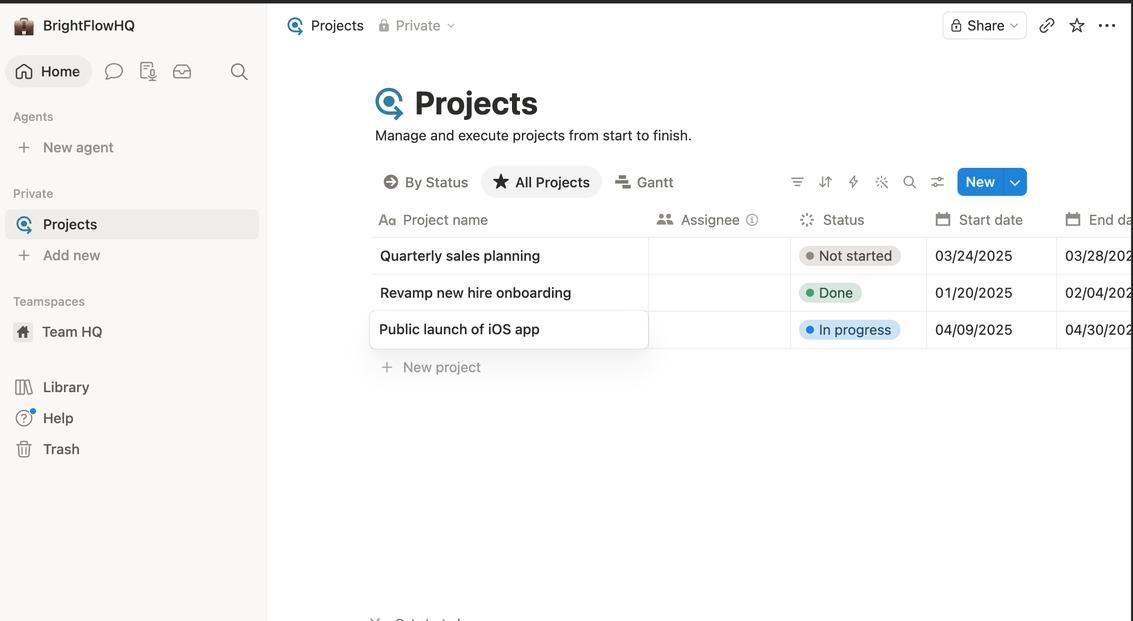
    Notion all-projects table view with status and dates
    The same database as a sortable table, every view type is included on every plan.
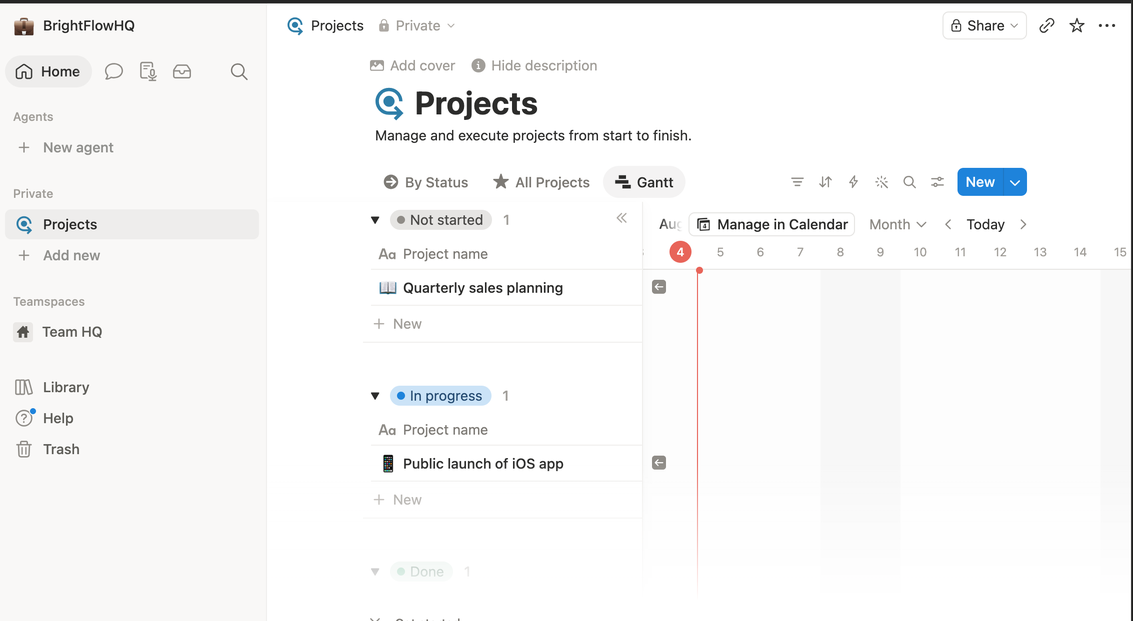
    Notion Gantt timeline view of projects
    Gantt/timeline view ships free too, often a paid add-on elsewhere.

    The risk is the blank-canvas problem. Notion gives you infinite freedom and zero opinion, which means the structure is only as good as the discipline of whoever builds it. Teams without a “Notion person” often end up with a sprawling, half-abandoned workspace.

    Choose Notion if: your work revolves around documents and knowledge, you’re solo or a small team, and someone on the team enjoys building systems.

    Avoid if: you need strict task accountability across many people, or nobody wants to maintain the workspace.

    ClickUp: The Everything Platform

    ClickUp’s pitch is “one app to replace them all,” and it takes that seriously: tasks, docs, goals, whiteboards, time tracking, dashboards, automation, it’s all in there. For operations-heavy teams that genuinely use those capabilities, consolidating tools into one subscription is real money saved.

    The cost is complexity. ClickUp has the steepest learning curve of the three, and its abundance of views, settings, and features can overwhelm teams that just wanted a task list. It rewards power users and punishes casual ones.

    Choose ClickUp if: you’re consolidating multiple tools, you have complex workflows (client ops, agencies, product teams), and you’re willing to invest setup time.

    Avoid if: your team resists complicated software, or your needs are simple enough that most features would sit unused.

    Asana: The Focused Finisher

    Asana does fewer things than the other two, on purpose. It’s a project and task manager with an opinionated, clean design, and that focus is exactly why teams adopt it successfully. Onboarding is fast, the interface stays out of the way, and the question “who’s doing what by when” is always easy to answer.

    The tradeoff is depth. Asana isn’t trying to be your wiki or your document workspace, so most teams pair it with other tools. And at the paid tier it’s the priciest per user of the three.

    Choose Asana if: you want a team actually using the tool within a week, your priority is task clarity and accountability, and you’re fine keeping docs elsewhere.

    Avoid if: you want one tool for everything, or you’re price-sensitive at team scale.

    The Bottom Line

    • Solo freelancer or docs-driven small team → Notion
    • Ops-heavy team consolidating tools, comfortable with complexity → ClickUp
    • Team that needs adoption and accountability fast → Asana

    All three have free tiers worth testing, but test with a real project, not a toy one. The tool that survives contact with your actual Tuesday is the right one.

    FAQ

    Which is easiest to learn: Notion, ClickUp or Asana?

    Asana is generally the most approachable for straightforward task management. Notion is flexible but starts as a blank page you must design. ClickUp packs the most features and has the steepest learning curve.

    Can Notion replace a project management tool?

    For solo work and small teams, often yes, using databases and board views. Larger teams that need dependencies, workload balancing and reporting usually prefer Asana or ClickUp.

    Which is best for a small team?

    Docs and knowledge-heavy teams tend to prefer Notion; teams that want everything in one configurable tool prefer ClickUp; teams that mainly need clear owners and deadlines prefer Asana.