
Category: Productivity

  • Notion Free vs Plus vs Business: Which Plan Do You Actually Need? (2026)

    Notion Free vs Plus vs Business: Which Plan Do You Actually Need? (2026)

    Notion’s pricing page makes every plan look essential. The truth is simpler: the Free plan is genuinely excellent for individuals, Plus exists for one very specific reason, and Business is for teams that have outgrown spreadsheet-style permissions. This guide tells you exactly which line you fall on, and when the upgrade is worth real money.

    Disclosure: some links below are affiliate links. If you purchase through them we may earn a commission at no extra cost to you, it never affects our picks. How we review.

    Quick answer: Notion Plus is our top pick (best all-around for small teams), with Notion Free the smart budget buy. Full scores, trade-offs and who each pick is not for, below.

    Quick Comparison

    Plan Price (billed annually) Best for The real limit
    Notion Free $0 Individuals, personal systems 7-day page history, 10 guest limit, blocks cap only when collaborating
    Notion Plus ~$10/user/month Small teams, unlimited uploads Permissions stay basic
    Notion Business ~$15-20/user/month Growing companies Price scales fast with headcount

    Prices approximate, check Notion’s pricing page for current figures and regional currency.
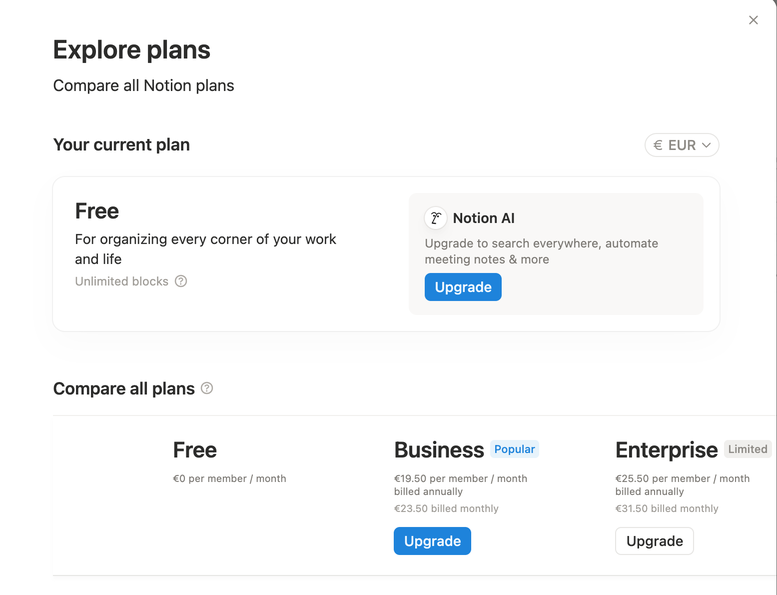
    Notion Explore Plans screen showing Free, Business and Enterprise pricing
    Notion’s plan screen from our demo workspace (EUR pricing, August 2026), we run the Free plan.
    The numbers at a glance

    BrightFlow Scorecards

    Our independent assessment, a weighted rubric (Performance 40%, Ease of use 20%, Features 20%, Value 20%). Scored out of 10.

    Notion Free
    Best free pick for individuals
    8.1
    BrightFlow Score
    💰 BEST VALUE
    Performance8.0
    Ease of use8.4
    Features7.2
    Value9.1
    Notion Plus
    Best all-around for small teams
    8.7
    BrightFlow Score
    🏆 EDITOR’S PICK
    Performance9.0
    Ease of use8.8
    Features8.2
    Value8.5
    Notion Business
    Best for larger teams
    8.3
    BrightFlow Score
    Performance8.6
    Ease of use8.0
    Features8.8
    Value7.6
    How we score: the BrightFlow Score follows our published rubric, no brand pays for placement, scores or badges. Read how we review and our affiliate disclosure.

    Notion Free: Best free pick for individuals

    If you’re one person building a second brain, a job-search tracker, a content calendar, or a personal wiki: stop reading and use the Free plan. You get unlimited pages and blocks for personal use, the full database feature set, synced blocks, and API access. The limits that matter, page history capped at 7 days and a 10-guest ceiling, simply don’t bite most solo users.
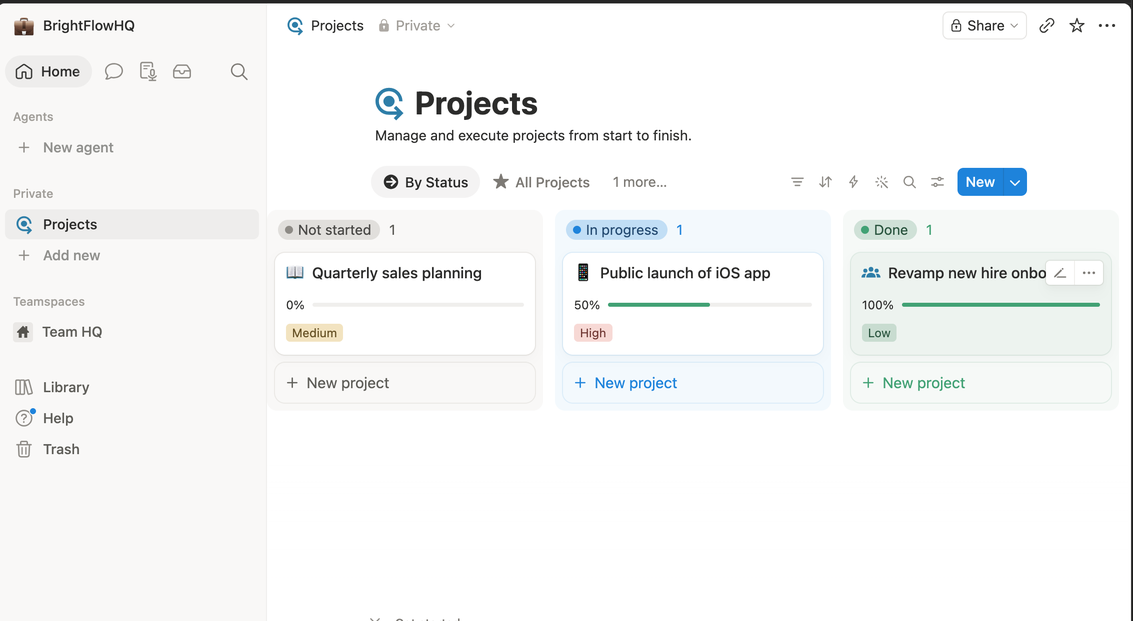
    Notion projects board view with status columns on the Free plan
    Our demo Projects board on Notion’s Free plan, statuses, progress bars and priorities, no paid features required.

    Who it’s not for: anyone whose Notion is load-bearing for a team. The moment two of you edit the same workspace daily, the Free plan’s collaboration block cap becomes a real wall.

    Notion Plus: Best all-around for small teams

    Plus is the “we actually work in here” plan. Unlimited blocks for teams, unlimited file uploads (Free caps files at 5 MB, the limit you’ll actually hit first), 30-day page history, and up to 100 guests. For a 2–5 person team running projects, docs and a lightweight CRM in one place, roughly ten dollars per person is cheap for what it replaces.

    Who it’s not for: solo users who feel vaguely guilty using free software. Guilt is not a business case, stay on Free until you hit a wall with a name.

    Notion Business: Best for larger teams

    Business adds the things ops and IT people ask about: SAML single sign-on, private teamspaces, PDF export of whole workspaces, and 90-day page history. New in recent updates, most Business tiers also bundle Notion AI, which changes the math if your team was paying for the AI add-on anyway.

    Who it’s not for: teams under ~10 people without compliance requirements. You’d be paying for admin features nobody uses.

    What about Notion AI?

    Notion AI writes, summarizes and autofills databases inside your workspace. Bundled into Business-and-up plans, it’s a genuine bonus. As a paid add-on on Free or Plus, it’s worth it only if you already reach for AI while writing, if you have a ChatGPT or Claude subscription you actually use, you can skip it without missing much.

    The honest decision path

    Solo → Free, no caveats. Small team hitting the file-size or history limits → Plus. Need SSO, serious permissions, or bundled AI at scale → Business. Still torn between Notion and its rivals? Our Notion vs ClickUp vs Asana comparison settles the “which tool” question, and our solopreneur software guide shows where Notion fits in a one-person stack.

    FAQ

    Is Notion’s Free plan really free forever?

    Yes. It’s a genuine free tier, not a trial, unlimited pages and blocks for individual use, with paid plans existing for team collaboration and admin features.

    Can I downgrade from Plus back to Free?

    Yes, at any time. Your content stays; you just lose the paid limits (longer history, unlimited team blocks, big file uploads) going forward.

    Does Notion offer discounts?

    Annual billing is roughly 20% cheaper than monthly, students and educators get Plus features free with an academic email, and startups can often get credits through Notion’s startup program.

    Is Notion AI included in the price?

    On newer Business and Enterprise plans it’s typically bundled. On Free and Plus it’s a paid add-on per member, worth it mainly if AI-assisted writing is already part of your workflow.

  • Best Project Management & Budgeting Software for Solopreneurs (2026)

    Best Project Management & Budgeting Software for Solopreneurs (2026)

    Solopreneur software has one requirement that team software doesn’t: it has to be worth maintaining when nobody’s checking. A tool that needs an admin, a workflow meeting, or a weekly cleanup session is dead on arrival for a one-person business.

    So this guide optimizes for exactly that, low-overhead tools that keep working when you’re busy doing the actual work.

    Disclosure: some links below are affiliate links. If you purchase through them we may earn a commission at no extra cost to you. This doesn’t affect our rankings.

    Quick answer: The best project management and money-tracking tools for one-person businesses, picked for low overhead, honest pricing, and tools you’ll actually keep using.

    Quick Comparison

    Tool Category Starting Price Why It Fits Solo Work
    Notion Projects + docs + everything Free; ~$10/mo paid One workspace for the whole business
    Trello Visual task management Free; ~$5/mo paid Simplest board that still works
    Todoist Task management Free; ~$4/mo paid Fastest capture, lowest friction
    Wave Invoicing + accounting Free core features Real invoicing at zero cost
    QuickBooks Solopreneur Accounting + taxes ~$20/mo Serious bookkeeping when revenue grows

    Prices change frequently, confirm current pricing on each vendor’s site.

    The numbers at a glance

    BrightFlow Scorecards

    Our independent assessment, a weighted rubric (Performance 40%, Ease of use 20%, Features 20%, Value 20%) informed by specs, owner-feedback patterns and professional testing coverage. Scored out of 10.

    Notion
    The whole business in one tab
    8.3
    BrightFlow Score
    🏆 EDITOR’S PICK
    Performance8.5
    Ease of use8.2
    Features8.0
    Value8.2
    Trello
    Simple visual boards
    8.3
    BrightFlow Score
    💰 BEST VALUE
    Performance8.2
    Ease of use9.2
    Features7.4
    Value8.4
    Todoist
    Just a great task list
    8.2
    BrightFlow Score
    Performance8.5
    Ease of use8.2
    Features7.8
    Value8.2
    Wave
    Free invoicing done right
    8.3
    BrightFlow Score
    Performance8.5
    Ease of use8.2
    Features8.0
    Value8.2
    QuickBooks Solopreneur
    When bookkeeping gets real
    8.3
    BrightFlow Score
    Performance8.5
    Ease of use8.2
    Features7.9
    Value8.2
    How we score: the BrightFlow Score follows our published rubric, no brand pays for placement, scores or badges. Owner-rating figures appear only where we can verify them, and are refreshed quarterly. Read how we review and our affiliate disclosure.

    Managing the Work

    Notion: The Whole Business in One Tab

    For solopreneurs, Notion’s pitch is strongest: client tracker, project boards, content calendar, meeting notes, and SOPs in one place, mostly on the free plan. The blank-canvas problem is smaller solo, you only need a structure you understand.

    Best for: Solopreneurs whose work is project- and document-heavy (consultants, writers, designers).
    Watch out for: The temptation to endlessly redesign your setup instead of working.

    Trello: The Board That Refuses to Be Complicated

    Trello is a kanban board: cards move left to right, from “to do” to “done.” That’s the whole model, and for a one-person pipeline, client leads, content pieces, orders, it’s often all you need. Setup takes minutes and maintenance is near zero.

    Best for: Visual thinkers with a pipeline-shaped workflow.
    Watch out for: Complex multi-project work; Trello’s simplicity stops scaling eventually.

    Todoist: For People Who Just Need a Task List

    Todoist wins on capture speed: type “invoice Sarah every last Friday” and it schedules a recurring task. No boards, no databases, a clean, reliable list with natural-language smarts. It’s the tool most likely to still be in use a year after you adopt it.

    Best for: Anyone whose real need is remembering commitments, not managing projects.
    Watch out for: It won’t hold project context, pair it with a docs tool.

    Managing the Money

    Wave: Free Invoicing That’s Actually Good

    Wave gives you professional invoicing, payment acceptance, and basic accounting with no monthly fee, they earn from payment processing instead. For early-stage solo businesses, it removes the “am I earning enough to justify accounting software” question entirely.

    Best for: New and early-revenue solopreneurs who need invoices out the door.
    Watch out for: Payment processing fees add up at volume; feature depth is basic beyond invoicing.

    QuickBooks Solopreneur: When Bookkeeping Gets Real

    Once revenue is steady, expense categorization, quarterly tax estimates, and clean reports stop being optional. QuickBooks’ solopreneur tier automates transaction tracking, separates business from personal spending, and produces the numbers you (or your accountant) need at tax time.

    Best for: Established solopreneurs with real transaction volume.
    Watch out for: Overkill on day one, start with Wave and graduate when the bookkeeping starts hurting.

    The Practical Stack

    Most one-person businesses are well served by exactly two subscriptions or fewer:

    1. Starting out: Trello or Todoist (free) + Wave (free), total cost: $0
    2. Growing: Notion (~$10/mo) + Wave, total cost: ~$10/mo
    3. Established: Notion + QuickBooks Solopreneur, total cost: ~$30/mo

    Resist the urge to build a bigger stack than your business. Every tool you add is a maintenance job you’ve assigned to your only employee, you.

    FAQ

    What software does a solopreneur actually need to start?

    Four categories cover almost everything: a task or project tool, a calendar with a booking link, invoicing and basic accounting, and file storage. All four have capable free tiers.

    Should a solopreneur use Wave or QuickBooks?

    Wave suits simple invoicing and bookkeeping on a small budget. QuickBooks is more capable and more familiar to accountants, which matters once your finances get complex. Ask your accountant which they prefer before committing.

    When should I start paying for business software?

    When a free tier’s limit blocks real work, not when an upgrade simply looks nicer. Paying to feel more organized is the most common and least useful software spend.