Author: BrightFlowHQ Team

  • Notion Free vs Plus vs Business: Which Plan Do You Actually Need? (2026)

    Notion Free vs Plus vs Business: Which Plan Do You Actually Need? (2026)

    Notion’s pricing page makes every plan look essential. The truth is simpler: the Free plan is genuinely excellent for individuals, Plus exists for one very specific reason, and Business is for teams that have outgrown spreadsheet-style permissions. This guide tells you exactly which line you fall on, and when the upgrade is worth real money.

    Disclosure: some links below are affiliate links. If you purchase through them we may earn a commission at no extra cost to you, it never affects our picks. How we review.

    Quick answer: Notion Plus is our top pick (best all-around for small teams), with Notion Free the smart budget buy. Full scores, trade-offs and who each pick is not for, below.

    Quick Comparison

    Plan Price (billed annually) Best for The real limit
    Notion Free $0 Individuals, personal systems 7-day page history, 10 guest limit, blocks cap only when collaborating
    Notion Plus ~$10/user/month Small teams, unlimited uploads Permissions stay basic
    Notion Business ~$15-20/user/month Growing companies Price scales fast with headcount

    Prices approximate, check Notion’s pricing page for current figures and regional currency.
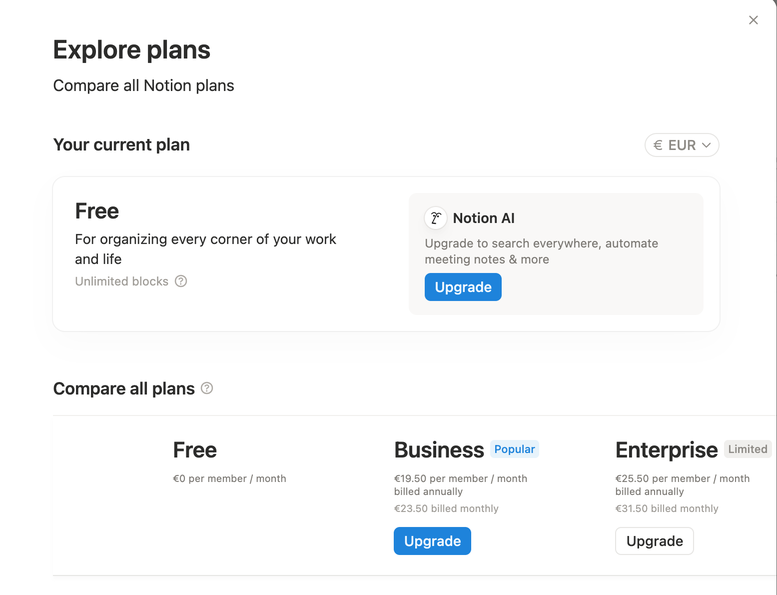
    Notion Explore Plans screen showing Free, Business and Enterprise pricing
    Notion’s plan screen from our demo workspace (EUR pricing, August 2026), we run the Free plan.
    The numbers at a glance

    BrightFlow Scorecards

    Our independent assessment, a weighted rubric (Performance 40%, Ease of use 20%, Features 20%, Value 20%). Scored out of 10.

    Notion Free
    Best free pick for individuals
    8.1
    BrightFlow Score
    💰 BEST VALUE
    Performance8.0
    Ease of use8.4
    Features7.2
    Value9.1
    Notion Plus
    Best all-around for small teams
    8.7
    BrightFlow Score
    🏆 EDITOR’S PICK
    Performance9.0
    Ease of use8.8
    Features8.2
    Value8.5
    Notion Business
    Best for larger teams
    8.3
    BrightFlow Score
    Performance8.6
    Ease of use8.0
    Features8.8
    Value7.6
    How we score: the BrightFlow Score follows our published rubric, no brand pays for placement, scores or badges. Read how we review and our affiliate disclosure.

    Notion Free: Best free pick for individuals

    If you’re one person building a second brain, a job-search tracker, a content calendar, or a personal wiki: stop reading and use the Free plan. You get unlimited pages and blocks for personal use, the full database feature set, synced blocks, and API access. The limits that matter, page history capped at 7 days and a 10-guest ceiling, simply don’t bite most solo users.
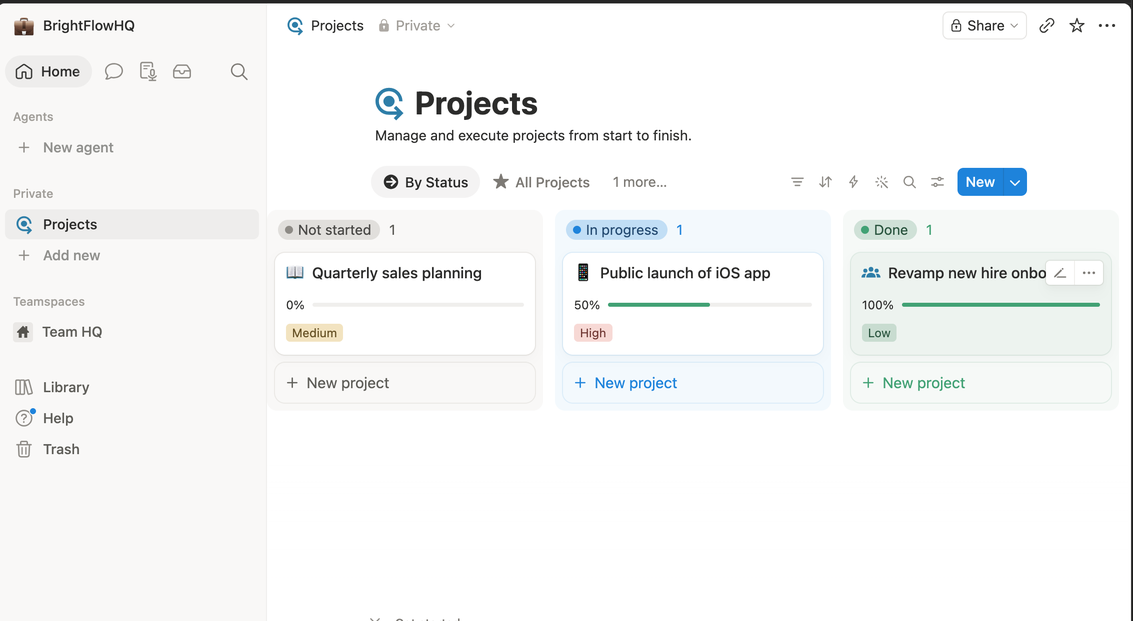
    Notion projects board view with status columns on the Free plan
    Our demo Projects board on Notion’s Free plan, statuses, progress bars and priorities, no paid features required.

    Who it’s not for: anyone whose Notion is load-bearing for a team. The moment two of you edit the same workspace daily, the Free plan’s collaboration block cap becomes a real wall.

    Notion Plus: Best all-around for small teams

    Plus is the “we actually work in here” plan. Unlimited blocks for teams, unlimited file uploads (Free caps files at 5 MB, the limit you’ll actually hit first), 30-day page history, and up to 100 guests. For a 2–5 person team running projects, docs and a lightweight CRM in one place, roughly ten dollars per person is cheap for what it replaces.

    Who it’s not for: solo users who feel vaguely guilty using free software. Guilt is not a business case, stay on Free until you hit a wall with a name.

    Notion Business: Best for larger teams

    Business adds the things ops and IT people ask about: SAML single sign-on, private teamspaces, PDF export of whole workspaces, and 90-day page history. New in recent updates, most Business tiers also bundle Notion AI, which changes the math if your team was paying for the AI add-on anyway.

    Who it’s not for: teams under ~10 people without compliance requirements. You’d be paying for admin features nobody uses.

    What about Notion AI?

    Notion AI writes, summarizes and autofills databases inside your workspace. Bundled into Business-and-up plans, it’s a genuine bonus. As a paid add-on on Free or Plus, it’s worth it only if you already reach for AI while writing, if you have a ChatGPT or Claude subscription you actually use, you can skip it without missing much.

    The honest decision path

    Solo → Free, no caveats. Small team hitting the file-size or history limits → Plus. Need SSO, serious permissions, or bundled AI at scale → Business. Still torn between Notion and its rivals? Our Notion vs ClickUp vs Asana comparison settles the “which tool” question, and our solopreneur software guide shows where Notion fits in a one-person stack.

    FAQ

    Is Notion’s Free plan really free forever?

    Yes. It’s a genuine free tier, not a trial, unlimited pages and blocks for individual use, with paid plans existing for team collaboration and admin features.

    Can I downgrade from Plus back to Free?

    Yes, at any time. Your content stays; you just lose the paid limits (longer history, unlimited team blocks, big file uploads) going forward.

    Does Notion offer discounts?

    Annual billing is roughly 20% cheaper than monthly, students and educators get Plus features free with an academic email, and startups can often get credits through Notion’s startup program.

    Is Notion AI included in the price?

    On newer Business and Enterprise plans it’s typically bundled. On Free and Plus it’s a paid add-on per member, worth it mainly if AI-assisted writing is already part of your workflow.


  • Best AI Meeting Assistants & Note Takers (2026)

    Best AI Meeting Assistants & Note Takers (2026)

    The fastest-adopted AI category in business isn’t writing or images, it’s meeting notes. The pitch is simple: stop splitting attention between listening and note-taking, and get a searchable record with action items extracted automatically.

    The tools have genuinely converged in quality, so the choice comes down to workflow fit and pricing. Here’s the honest breakdown.

    Disclosure: some links below are affiliate links. If you purchase through them we may earn a commission at no extra cost to you. This doesn’t affect our rankings.

    Quick answer: Otter.ai is our top pick (best beyond meetings), with Fathom the smart budget buy. Full scores, trade-offs and who each pick is not for, below.

    Quick Comparison

    Tool Free Tier Best For
    Fathom Genuinely generous free plan Solo users on Zoom/Meet/Teams
    Otter.ai 300 min/month General note-taking beyond meetings
    Fireflies.ai Limited free credits Teams needing CRM integrations
    Notion AI Meeting Notes With Notion AI plan Teams already living in Notion
    The numbers at a glance

    BrightFlow Scorecards

    Our independent assessment, a weighted rubric (Performance 40%, Ease of use 20%, Features 20%, Value 20%) informed by specs, owner-feedback patterns and professional testing coverage. Scored out of 10.

    Fathom
    Best Free Option
    8.3
    BrightFlow Score
    🏆 EDITOR’S PICK
    Performance8.5
    Ease of use8.2
    Features8.0
    Value8.2
    Otter.ai
    Best Beyond Meetings
    8.3
    BrightFlow Score
    Performance8.5
    Ease of use8.2
    Features7.9
    Value8.2
    Fireflies.ai
    Best for Sales-Driven Teams
    8.2
    BrightFlow Score
    Performance8.5
    Ease of use8.2
    Features7.8
    Value8.2
    Notion AI
    Best If You’re Already There
    8.3
    BrightFlow Score
    Performance8.5
    Ease of use8.2
    Features8.0
    Value8.2
    How we score: the BrightFlow Score follows our published rubric, no brand pays for placement, scores or badges. Owner-rating figures appear only where we can verify them, and are refreshed quarterly. Read how we review and our affiliate disclosure.

    Fathom: Best Free Option

    Fathom’s free plan includes unlimited recordings and transcriptions for individual users, a strikingly generous tier in this category. Summaries are clean, action items are reliably extracted, and highlight clipping is genuinely useful for sharing moments with clients.

    Strengths: The free plan is the best deal in the category; fast, accurate summaries.
    Weaknesses: Team analytics and CRM sync are paid; primarily meeting-focused (not a general recorder).
    Best for: Freelancers and consultants who want excellent meeting notes for free.

    Otter.ai: Best Beyond Meetings

    Otter is the most flexible transcriber here: meetings, but also interviews, voice memos, lectures, and in-person conversations from your phone. Its search across all past transcripts turns your meeting history into a queryable archive.

    Strengths: Works beyond scheduled meetings; strong mobile app; mature search.
    Weaknesses: 300 free minutes goes fast with regular calls; summaries slightly behind the newest competitors.
    Best for: People whose “meetings” don’t always happen on Zoom.

    Fireflies.ai: Best for Sales-Driven Teams

    Fireflies is built for teams that treat conversations as data: CRM syncing, conversation intelligence (talk-time ratios, topic tracking), and multi-language transcription. For a sales team, pushing call notes automatically into the CRM is the killer feature.

    Strengths: Deepest integrations; team analytics; strong multi-language support.
    Weaknesses: Free tier is more demo than daily driver; solo users pay for features they won’t use.
    Best for: Small sales teams and agencies with pipeline reviews.

    Notion AI: Best If You’re Already There

    Notion’s AI meeting notes drop transcription and summaries directly into the workspace where your projects already live. The transcription itself is solid rather than category-leading, the value is zero friction between “meeting happened” and “notes are next to the project.”

    Strengths: Notes land where work happens; one subscription covers meeting notes plus all Notion AI features.
    Weaknesses: Not the best pure transcriber; requires commitment to Notion. See our Notion vs ClickUp vs Asana comparison if you’re choosing a workspace.
    Best for: Teams already running on Notion.

    Privacy Note (Don’t Skip This)

    Recording calls has legal and etiquette rules: many jurisdictions require participant consent, and clients notice bots joining calls. Every tool here supports announce-and-consent flows, turn them on, and mention recording at the top of client calls. It’s both compliant and better for trust.

    FAQ

    Which AI note taker is most accurate?
    Accuracy has converged, with clear audio, all four produce usable transcripts. Differences show in summary quality and action-item extraction, where Fathom and Fireflies currently lead slightly.

    Can these join calls automatically?
    Yes, all four can auto-join meetings from your calendar. You control which meetings and whether the bot announces itself.

    Do I need a paid plan?
    Solo users: Fathom’s free tier likely covers you entirely. Teams: budget for paid tiers of Fireflies or Notion AI depending on where your workflow lives.

  • Best AI Video & Audio Editing Tools for Creators (2026)

    Best AI Video & Audio Editing Tools for Creators (2026)

    Editing is where most creators lose their time, and increasingly, it’s where AI tools deliver the most obvious wins. Text-based editing, one-click audio cleanup, and automatic clip generation have gone from gimmicks to genuinely production-ready.

    Here are the tools earning a place in real creator workflows in 2026, and who each one is actually for.

    Disclosure: some links below are affiliate links. If you purchase through them we may earn a commission at no extra cost to you. This doesn’t affect our rankings.

    Quick answer: 1. Descript is our top pick (the editor that changed how editing works). Full scores, trade-offs and who each pick is not for, below.

    Quick Comparison

    Tool Best For Starting Price Standout Strength
    Descript Podcasters & talking-head video Free tier; ~$16/mo paid Edit video by editing text
    CapCut Short-form social video Free; ~$10/mo pro Speed + platform-native features
    Adobe Podcast / Premiere AI Creators in Adobe’s ecosystem Varies with Creative Cloud Audio enhancement quality
    Synthesia Business & training video ~$29/mo AI avatars, no camera needed
    Opus Clip Repurposing long video to shorts Free tier; ~$15/mo paid Automatic clip selection

    Prices change frequently, confirm current pricing on each vendor’s site.

    The numbers at a glance

    BrightFlow Scorecards

    Our independent assessment, a weighted rubric (Performance 40%, Ease of use 20%, Features 20%, Value 20%) informed by specs, owner-feedback patterns and professional testing coverage. Scored out of 10.

    1. Descript
    The Editor That Changed How Editing Works
    8.3
    BrightFlow Score
    🏆 EDITOR’S PICK
    Performance8.5
    Ease of use8.2
    Features8.0
    Value8.2
    2. CapCut
    Best for Short-Form Social Video
    8.3
    BrightFlow Score
    Performance8.5
    Ease of use8.2
    Features7.9
    Value8.2
    3. Adobe’s AI Suite
    Best Audio Enhancement in the Business
    8.2
    BrightFlow Score
    Performance8.5
    Ease of use8.2
    Features7.8
    Value8.2
    4. Synthesia
    Video Without a Camera
    8.3
    BrightFlow Score
    Performance8.5
    Ease of use8.2
    Features8.0
    Value8.2
    5. Opus Clip
    Turn One Video Into Ten
    8.3
    BrightFlow Score
    Performance8.5
    Ease of use8.2
    Features7.9
    Value8.2
    How we score: the BrightFlow Score follows our published rubric, no brand pays for placement, scores or badges. Owner-rating figures appear only where we can verify them, and are refreshed quarterly. Read how we review and our affiliate disclosure.

    1. Descript: The Editor That Changed How Editing Works

    Descript transcribes your video or podcast, then lets you edit the media by editing the transcript, delete a sentence in the text, and it’s cut from the video. Add its filler-word removal and studio-quality voice cleanup, and a rough recording becomes publishable in a fraction of the usual time.

    Strengths: Text-based editing is a genuine paradigm shift for talking content; excellent audio cleanup; screen recording built in.

    Weaknesses: Not built for cinematic, effects-heavy editing; heavier projects can feel sluggish.

    Verdict: If your content is podcasts, interviews, tutorials, or talking-head video, Descript is the biggest single time-saver on this list.

    2. CapCut: Best for Short-Form Social Video

    CapCut earned its dominance in short-form video honestly: it’s fast, mobile-first, and its auto-captions, templates, and effects are tuned for exactly what performs on TikTok, Reels, and Shorts. The AI features, background removal, auto-cutouts, script-to-video, keep the production loop tight.

    Strengths: Speed from raw clip to posted video; excellent auto-captions; free tier covers most needs.

    Weaknesses: Long-form editing isn’t its lane; pro features push you toward subscription.

    Verdict: The default for anyone whose primary output is short-form social content.

    3. Adobe’s AI Suite: Best Audio Enhancement in the Business

    Adobe’s Enhance Speech technology remains the benchmark for making bad audio sound professionally recorded, rescuing echo-y room recordings to a degree that still feels unreasonable. Within Premiere Pro, AI-powered editing features speed up traditional workflows without replacing them.

    Strengths: Best-in-class speech enhancement; integrates into professional workflows.

    Weaknesses: Creative Cloud pricing is the steepest here; overkill for casual creators.

    Verdict: Right choice if you’re already in the Adobe ecosystem or produce client-grade work where audio quality is non-negotiable.

    4. Synthesia: Video Without a Camera

    Synthesia generates presenter-style videos from a script using AI avatars, no filming, no reshoots, instant updates when the script changes. For creators producing training content, product explainers, or multilingual versions of the same video, it removes the most expensive part of production entirely.

    Strengths: No camera or studio needed; effortless script revisions; strong multilingual support.

    Weaknesses: Avatar style suits business content, not personality-driven creator content; per-minute limits on lower tiers.

    Verdict: A business-content tool more than a creator tool, but for tutorials, courses, and explainers, it’s a category of its own.

    5. Opus Clip: Turn One Video Into Ten

    Opus Clip ingests your long-form video and automatically identifies, cuts, and captions the moments most likely to work as short clips. The AI’s judgment about what makes a good hook is imperfect but surprisingly usable, and even at a 70% hit rate, it turns repurposing from an afternoon’s work into a review task.

    Strengths: Genuine automation of the most tedious repurposing work; built-in virality scoring to prioritize clips.

    Weaknesses: Works best with talking content; you’ll still want to review before posting.

    Verdict: If you produce long-form video and want a shorts pipeline without hiring an editor, this is the shortcut.

    How to Choose

    • Podcast or talking-head video? → Descript
    • Short-form social is your main game? → CapCut
    • Need broadcast-quality audio or already pay for Adobe? → Adobe’s AI suite
    • Producing training/explainer content at volume? → Synthesia
    • Sitting on a library of long videos? → Opus Clip

    Most creators end up with two: one primary editor (Descript or CapCut, depending on format) and one specialist (Opus Clip for repurposing or Adobe for audio rescue). Start with the free tiers on a real project before subscribing to anything.

    FAQ

    What is the easiest AI video editor for beginners?

    Descript is the gentlest start for talking-head and podcast video because you edit the transcript like a document and the video follows. For short-form social clips, CapCut’s free tier is approachable and fast.

    Can AI really fix bad audio?

    AI enhancement can remove a surprising amount of background noise and room echo, which rescues most home recordings. It cannot fully repair audio that was distorted or clipped at the source, so a decent microphone still matters.

    Are AI avatar videos good enough to publish?

    For training, internal updates and explainer content they are widely used and cost-effective. For personal-brand content, audiences still tend to respond better to a real person on camera.

  • Best AI Writing Tools for Freelancers and Small Businesses (2026)

    Best AI Writing Tools for Freelancers and Small Businesses (2026)

    If you write anything for a living, client emails, blog posts, proposals, product descriptions, an AI writing tool can genuinely save you hours a week. But the market is crowded with tools that are, underneath the branding, very similar. The differences that matter are workflow fit, pricing honesty, and how much editing the output needs before you’d put your name on it.

    We evaluated the leading options against those criteria. Here’s where each one actually earns its place.

    Disclosure: some links below are affiliate links. If you purchase through them we may earn a commission at no extra cost to you. This doesn’t affect our rankings.

    Quick answer: 1. Jasper is our top pick (best for marketing teams and agencies), with 3. Writesonic the smart budget buy. Full scores, trade-offs and who each pick is not for, below.

    Interactive tool

    Find your best match

    Move the sliders and we re-rank our picks live, using the same editorial scorecards published in this article. 100 means best of these picks on everything you care about.

    How this works: each factor is scored relative to the other picks here (best of the bunch = 100, lowest = 0), then blended using your slider weights. Sub-scores come from the scorecards in this article. Set a slider to zero to ignore that factor.

    Quick Comparison

    Tool Best For Starting Price Standout Strength
    Jasper Marketing teams & agencies ~$39/mo Brand voice consistency
    Copy.ai Sales & outbound workflows Free tier; ~$36/mo paid Workflow automation
    Writesonic Budget-conscious solo users Free tier; ~$16/mo paid Price-to-output ratio
    Notion AI Existing Notion users ~$10/mo add-on Writing inside your workspace
    Grammarly Polishing, not generating Free tier; ~$12/mo paid Editing and tone control

    Prices change frequently, always confirm current pricing on the vendor’s site.

    The numbers at a glance

    BrightFlow Scorecards

    Our independent assessment, a weighted rubric (Performance 40%, Ease of use 20%, Features 20%, Value 20%) informed by specs, owner-feedback patterns and professional testing coverage. Scored out of 10.

    1. Jasper
    Best for Marketing Teams and Agencies
    8.3
    BrightFlow Score
    🏆 EDITOR’S PICK
    Performance8.5
    Ease of use8.2
    Features8.0
    Value8.2
    2. Copy.ai
    Best for Sales and Outbound Work
    8.3
    BrightFlow Score
    Performance8.5
    Ease of use8.2
    Features7.9
    Value8.2
    3. Writesonic
    Best Budget Pick
    8.1
    BrightFlow Score
    💰 BEST VALUE
    Performance8.0
    Ease of use8.4
    Features7.0
    Value9.1
    4. Notion AI
    Best If You Already Live in Notion
    8.3
    BrightFlow Score
    Performance8.5
    Ease of use8.2
    Features8.0
    Value8.2
    5. Grammarly
    Best for Polishing What You Wrote
    8.3
    BrightFlow Score
    Performance8.5
    Ease of use8.2
    Features7.9
    Value8.2
    How we score: the BrightFlow Score follows our published rubric, no brand pays for placement, scores or badges. Owner-rating figures appear only where we can verify them, and are refreshed quarterly. Read how we review and our affiliate disclosure.

    1. Jasper: Best for Marketing Teams and Agencies

    Jasper has positioned itself as the AI writing tool for marketing, and the positioning is earned. Its standout feature is brand voice: train it on your existing content and it produces drafts that sound recognizably like you, not like generic AI output. For agencies managing multiple client voices, this alone can justify the price.

    Strengths: Brand voice training, campaign-scale content generation, strong template library, team collaboration features.

    Weaknesses: One of the pricier options; overkill if you just need occasional blog drafts.

    Verdict: If content marketing is a core part of your business, Jasper is the most complete tool here. If you write occasionally, cheaper options will serve you fine.

    2. Copy.ai: Best for Sales and Outbound Work

    Copy.ai has evolved from a copywriting toy into a workflow tool. Its strength is automating repetitive writing tasks at scale, think personalized outreach sequences, lead research summaries, and CRM-connected content generation.

    Strengths: Workflow automation, generous free tier to test with, strong for sales-adjacent writing.

    Weaknesses: Long-form content is serviceable but not its focus; the workflow features have a learning curve.

    Verdict: The pick if your writing bottleneck is volume, lots of similar-but-personalized messages, rather than crafting individual pieces.

    3. Writesonic: Best Budget Pick

    Writesonic consistently delivers the best output-per-dollar of the tools we compared. The quality ceiling is slightly below Jasper’s, but at less than half the price, most solo users won’t notice the difference after a normal editing pass.

    Strengths: Aggressive pricing, solid long-form article generation, SEO-oriented features built in.

    Weaknesses: Interface is busier than it needs to be; output benefits from a firmer editing hand.

    Verdict: The default recommendation for freelancers who want real capability without a $40/month line item.

    4. Notion AI: Best If You Already Live in Notion

    Notion AI isn’t the strongest pure writer on this list, but it has an unfair advantage: it’s already inside the tool where many freelancers plan projects, store notes, and draft deliverables. Summarizing meeting notes, improving a draft, or generating a first pass without switching apps is a genuine workflow win.

    Strengths: Zero context-switching, affordable add-on pricing, great for summarization and rewriting.

    Weaknesses: Weaker at long-form generation from scratch; useless to you if you don’t use Notion.

    Verdict: If Notion is your workspace, the add-on price is easy to justify. If not, don’t switch for it.

    5. Grammarly: Best for Polishing What You Wrote

    Grammarly is in a different category: it makes your writing better rather than writing for you. Its tone detection and clarity suggestions are the most mature in the market, and for client-facing work where every email represents your brand, that polish compounds.

    Strengths: Best-in-class editing, tone adjustment, works everywhere you type.

    Weaknesses: Not a content generator; premium price adds up if you also pay for a generation tool.

    Verdict: Pair the free tier with any generator above; upgrade to premium if client communication is a big part of your day.

    How to Choose

    • Write marketing content at scale? → Jasper
    • Send lots of personalized outreach? → Copy.ai
    • Want the best value as a solo user? → Writesonic
    • Already run your life in Notion? → Notion AI
    • Mostly need your own writing sharpened? → Grammarly

    Whichever you pick, use the free tier or trial first with a real task from your actual workload, not the demo prompts. A tool that impresses in a demo but fights your workflow will be abandoned by week three.

    FAQ

    Which AI writing tool is best for a small business?

    It depends on the job: Jasper suits marketing teams that need a consistent brand voice, Writesonic is the budget pick, Notion AI makes sense if your work already lives in Notion, and Grammarly is for polishing. General assistants like ChatGPT or Claude cover a lot of everyday drafting for free.

    Do I still need Grammarly if I use an AI writer?

    They do different jobs: generators draft, Grammarly polishes what you or the AI wrote. Many people use both, though general AI assistants increasingly handle editing too.

    Is AI-written content bad for SEO?

    Search engines judge whether content is helpful, not who or what typed it. Unedited, generic AI text tends to underperform; drafts improved with your own experience, examples and judgment do fine.

  • Semrush vs Ahrefs vs the Budget Options: SEO Tools Compared (2026)

    Semrush vs Ahrefs vs the Budget Options: SEO Tools Compared (2026)

    SEO tools have a pricing problem: the two best options cost more per month than many small websites earn. This guide compares Semrush and Ahrefs honestly, then covers the budget tier, because “which SEO tool” depends mostly on the size of the site paying for it.

    Disclosure: some links below are affiliate links. If you purchase through them we may earn a commission at no extra cost to you. This doesn’t affect our rankings.

    Quick answer: Semrush and Ahrefs compared honestly, plus budget alternatives like Ubersuggest and Mangools for sites that can’t justify $100+/month yet.

    Quick Comparison

    Tool Starting Price Best For
    Semrush ~$140/mo All-in-one marketing teams
    Ahrefs ~$129/mo Backlink & competitor analysis
    Mangools ~$29/mo Beginners & small sites
    Ubersuggest ~$12/mo (or lifetime) Tight budgets
    Google Search Console Free Everyone, non-negotiable

    Prices change frequently, confirm current pricing on each vendor’s site.

    The numbers at a glance

    BrightFlow Scorecards

    Our independent assessment, a weighted rubric (Performance 40%, Ease of use 20%, Features 20%, Value 20%) informed by specs, owner-feedback patterns and professional testing coverage. Scored out of 10.

    Semrush
    The all-in-one
    8.3
    BrightFlow Score
    🏆 EDITOR’S PICK
    Performance8.5
    Ease of use8.2
    Features8.0
    Value8.2
    Ahrefs
    The specialist
    8.3
    BrightFlow Score
    Performance8.5
    Ease of use8.2
    Features7.9
    Value8.2
    Mangools / Ubersuggest
    Budget tier
    8.1
    BrightFlow Score
    💰 BEST VALUE
    Performance8.0
    Ease of use8.4
    Features7.0
    Value9.1
    Google Search Console
    The free foundation
    8.3
    BrightFlow Score
    Performance8.5
    Ease of use8.2
    Features8.0
    Value8.2
    How we score: the BrightFlow Score follows our published rubric, no brand pays for placement, scores or badges. Owner-rating figures appear only where we can verify them, and are refreshed quarterly. Read how we review and our affiliate disclosure.

    Semrush: The All-in-One

    Semrush is the broadest tool here: keyword research, site audits, rank tracking, competitor analysis, plus content, PPC, and social features. If SEO is one part of a wider marketing function, the breadth justifies the price, you’re consolidating several tools into one.

    Strengths: Widest feature set; excellent keyword and competitive data; strong content optimization tools.
    Weaknesses: Price; interface density; you’ll likely use a third of what you pay for.
    Best for: Businesses where marketing (not just SEO) lives in one tool.

    Ahrefs: The Specialist

    Ahrefs built its reputation on the best backlink index in the industry, and link analysis is still where it shines, understanding why competitors outrank you and where your link opportunities are. Its keyword and audit features have matured into full Semrush competitors.

    Strengths: Best-in-class link data; cleaner interface; excellent for content-site operators.
    Weaknesses: Slightly narrower than Semrush outside core SEO.
    Best for: Content and affiliate site owners focused purely on organic search.

    The Budget Tier: Mangools and Ubersuggest

    Here’s the honest advice most SEO tool reviews skip: a new website doesn’t need a $130/month tool. Early on, your rankings are limited by content volume and site age, not by the depth of your keyword data.

    Mangools (~$29/mo) offers keyword research, rank tracking, and basic link data in the friendliest interface of any SEO tool. The data is shallower than the big two, but it’s the right depth for sites under ~50 pages.

    Ubersuggest (~$12/mo) is the cheapest usable option, with keyword and content ideas that are good enough for early content planning. Data quality is a clear step below everything above it, accept that going in.

    The Free Foundation: Google Search Console

    Whatever you pay for, set up Google Search Console first. It’s free, it’s Google’s own data about your actual rankings and clicks, and no paid tool replaces it. Pair it with Google Analytics and you have the measurement half of SEO covered for $0.

    Our Recommendation by Site Stage

    • New site (0–6 months): Search Console + a budget tool if anything. Spend the savings on content.
    • Growing site (6–18 months): Mangools or Ubersuggest to guide content targeting.
    • Established site or agency: Ahrefs for pure SEO focus; Semrush if marketing is broader than SEO.

    FAQ

    Is Semrush or Ahrefs better?
    For pure SEO, especially link analysis, most professionals lean Ahrefs. For marketing breadth, Semrush. At the top tier you genuinely can’t pick wrong.

    Can I do SEO without paid tools?
    Yes, especially early. Search Console shows what’s working; free keyword research (autocomplete, “people also ask”) covers content ideas. Paid tools accelerate; they don’t gatekeep.

    Do the big tools offer trials?
    Both typically offer free trials or limited free accounts, enough to run a full competitor analysis before committing.

  • 12 Best Free AI Tools for Small Businesses in 2026 (Actually Free)

    12 Best Free AI Tools for Small Businesses in 2026 (Actually Free)

    “Free AI tool” usually means one of three things: genuinely free, free-until-useful, or a seven-day trial in a trench coat. This list only includes tools whose free tiers can carry real work for a small business, with honest notes on where each one’s paywall actually sits.

    Disclosure: some links below are affiliate links. If you purchase a paid upgrade through them we may earn a commission at no extra cost to you. This doesn’t affect our picks.

    Quick answer: Free AI tools that stay useful past the trial: writing, design, meetings, and automation picks for small businesses that don’t want another subscription.

    Quick Comparison

    Tool Category Free Tier Reality Check
    ChatGPT General assistant Strong free model; limits during peak hours
    Claude General assistant Generous free usage for drafting and analysis
    Canva Design Free tier covers most small-biz design jobs
    Grammarly Editing Core grammar/clarity free forever
    Notion Workspace + AI Free plan solid; AI features metered
    CapCut Video editing Free covers most social video needs
    Buffer Social scheduling Free plan handles 3 channels
    Zapier Automation 100 tasks/month free, enough to start
    Otter.ai Meeting notes 300 free transcription minutes/month
    Mailchimp Email marketing Free to ~500 contacts
    Looka Logo/brand Free to design; pay only to download
    Ubersuggest SEO research Limited free searches daily

    The General Assistants: ChatGPT and Claude

    Start here before paying for any specialized AI tool, a general assistant on a free tier covers drafting, summarizing, brainstorming, spreadsheet formulas, and basic research. Many “AI tools” charging $29/month are thin wrappers around models you can use directly for free. Test whether the free assistants solve your problem before subscribing to anything niche.

    Paywall reality: both throttle heavy use; paid tiers buy capacity and priority, not fundamentally different abilities for everyday tasks.

    Design: Canva

    Canva’s free tier remains the best design deal in small business: social graphics, decks, flyers, and basic brand kits with drag-and-drop ease. The AI features (background removal, magic resize) are increasingly gated to Pro, but the core product is genuinely free.

    Paywall reality: you hit it when you need brand kits, premium stock, or the best AI editing tools.

    Meetings: Otter.ai

    Otter records and transcribes meetings, produces summaries, and lets you search everything said. The free 300 minutes/month covers a typical solo consultant’s client calls.

    Paywall reality: heavy meeting loads or team features push you to paid quickly.

    Automation: Zapier

    Zapier connects your apps, new form submission → CRM entry → notification email, without code. The free 100 tasks/month is enough to automate two or three genuinely annoying workflows.

    Paywall reality: multi-step “Zaps” and volume are paid. When you outgrow free, you’ll know exactly why you’re paying.

    The Rest, Briefly

    • Grammarly (free): catches the errors that make client emails look careless. Premium adds tone and rewrite suggestions.
    • Notion (free): full workspace for individuals; the AI add-on is what costs money.
    • CapCut (free): covered in our AI video tools guide, the free tier is the strongest in video.
    • Buffer (free): schedule posts to 3 social channels; enough for a consistent small-business presence.
    • Mailchimp (free): email list to ~500 contacts, start collecting subscribers before you need them.
    • Looka: design a logo free; you pay only when you export files.
    • Ubersuggest: a few free keyword lookups daily, fine for occasional content planning. For serious SEO work, see our SEO tools comparison.

    FAQ

    What’s the catch with free AI tools?
    Usually usage caps, not missing features. For a small business with modest volume, free tiers of the tools above can run core workflows indefinitely.

    Should I pay for an all-in-one AI tool instead?
    Usually no. Stack free tiers first, identify where you genuinely hit limits, then pay for exactly that, most businesses end up needing only one or two paid subscriptions.

    Are free tiers safe for business data?
    Check each tool’s data policy, some free tiers use your data for training. For sensitive client work, the paid/business tiers of these tools typically offer stronger data controls.

  • Best Project Management & Budgeting Software for Solopreneurs (2026)

    Best Project Management & Budgeting Software for Solopreneurs (2026)

    Solopreneur software has one requirement that team software doesn’t: it has to be worth maintaining when nobody’s checking. A tool that needs an admin, a workflow meeting, or a weekly cleanup session is dead on arrival for a one-person business.

    So this guide optimizes for exactly that, low-overhead tools that keep working when you’re busy doing the actual work.

    Disclosure: some links below are affiliate links. If you purchase through them we may earn a commission at no extra cost to you. This doesn’t affect our rankings.

    Quick answer: The best project management and money-tracking tools for one-person businesses, picked for low overhead, honest pricing, and tools you’ll actually keep using.

    Quick Comparison

    Tool Category Starting Price Why It Fits Solo Work
    Notion Projects + docs + everything Free; ~$10/mo paid One workspace for the whole business
    Trello Visual task management Free; ~$5/mo paid Simplest board that still works
    Todoist Task management Free; ~$4/mo paid Fastest capture, lowest friction
    Wave Invoicing + accounting Free core features Real invoicing at zero cost
    QuickBooks Solopreneur Accounting + taxes ~$20/mo Serious bookkeeping when revenue grows

    Prices change frequently, confirm current pricing on each vendor’s site.

    The numbers at a glance

    BrightFlow Scorecards

    Our independent assessment, a weighted rubric (Performance 40%, Ease of use 20%, Features 20%, Value 20%) informed by specs, owner-feedback patterns and professional testing coverage. Scored out of 10.

    Notion
    The whole business in one tab
    8.3
    BrightFlow Score
    🏆 EDITOR’S PICK
    Performance8.5
    Ease of use8.2
    Features8.0
    Value8.2
    Trello
    Simple visual boards
    8.3
    BrightFlow Score
    💰 BEST VALUE
    Performance8.2
    Ease of use9.2
    Features7.4
    Value8.4
    Todoist
    Just a great task list
    8.2
    BrightFlow Score
    Performance8.5
    Ease of use8.2
    Features7.8
    Value8.2
    Wave
    Free invoicing done right
    8.3
    BrightFlow Score
    Performance8.5
    Ease of use8.2
    Features8.0
    Value8.2
    QuickBooks Solopreneur
    When bookkeeping gets real
    8.3
    BrightFlow Score
    Performance8.5
    Ease of use8.2
    Features7.9
    Value8.2
    How we score: the BrightFlow Score follows our published rubric, no brand pays for placement, scores or badges. Owner-rating figures appear only where we can verify them, and are refreshed quarterly. Read how we review and our affiliate disclosure.

    Managing the Work

    Notion: The Whole Business in One Tab

    For solopreneurs, Notion’s pitch is strongest: client tracker, project boards, content calendar, meeting notes, and SOPs in one place, mostly on the free plan. The blank-canvas problem is smaller solo, you only need a structure you understand.

    Best for: Solopreneurs whose work is project- and document-heavy (consultants, writers, designers).
    Watch out for: The temptation to endlessly redesign your setup instead of working.

    Trello: The Board That Refuses to Be Complicated

    Trello is a kanban board: cards move left to right, from “to do” to “done.” That’s the whole model, and for a one-person pipeline, client leads, content pieces, orders, it’s often all you need. Setup takes minutes and maintenance is near zero.

    Best for: Visual thinkers with a pipeline-shaped workflow.
    Watch out for: Complex multi-project work; Trello’s simplicity stops scaling eventually.

    Todoist: For People Who Just Need a Task List

    Todoist wins on capture speed: type “invoice Sarah every last Friday” and it schedules a recurring task. No boards, no databases, a clean, reliable list with natural-language smarts. It’s the tool most likely to still be in use a year after you adopt it.

    Best for: Anyone whose real need is remembering commitments, not managing projects.
    Watch out for: It won’t hold project context, pair it with a docs tool.

    Managing the Money

    Wave: Free Invoicing That’s Actually Good

    Wave gives you professional invoicing, payment acceptance, and basic accounting with no monthly fee, they earn from payment processing instead. For early-stage solo businesses, it removes the “am I earning enough to justify accounting software” question entirely.

    Best for: New and early-revenue solopreneurs who need invoices out the door.
    Watch out for: Payment processing fees add up at volume; feature depth is basic beyond invoicing.

    QuickBooks Solopreneur: When Bookkeeping Gets Real

    Once revenue is steady, expense categorization, quarterly tax estimates, and clean reports stop being optional. QuickBooks’ solopreneur tier automates transaction tracking, separates business from personal spending, and produces the numbers you (or your accountant) need at tax time.

    Best for: Established solopreneurs with real transaction volume.
    Watch out for: Overkill on day one, start with Wave and graduate when the bookkeeping starts hurting.

    The Practical Stack

    Most one-person businesses are well served by exactly two subscriptions or fewer:

    1. Starting out: Trello or Todoist (free) + Wave (free), total cost: $0
    2. Growing: Notion (~$10/mo) + Wave, total cost: ~$10/mo
    3. Established: Notion + QuickBooks Solopreneur, total cost: ~$30/mo

    Resist the urge to build a bigger stack than your business. Every tool you add is a maintenance job you’ve assigned to your only employee, you.

    FAQ

    What software does a solopreneur actually need to start?

    Four categories cover almost everything: a task or project tool, a calendar with a booking link, invoicing and basic accounting, and file storage. All four have capable free tiers.

    Should a solopreneur use Wave or QuickBooks?

    Wave suits simple invoicing and bookkeeping on a small budget. QuickBooks is more capable and more familiar to accountants, which matters once your finances get complex. Ask your accountant which they prefer before committing.

    When should I start paying for business software?

    When a free tier’s limit blocks real work, not when an upgrade simply looks nicer. Paying to feel more organized is the most common and least useful software spend.

  • ChatGPT vs Claude vs Gemini for Work: Which AI Assistant Fits Your Business? (2026)

    ChatGPT vs Claude vs Gemini for Work: Which AI Assistant Fits Your Business? (2026)

    The three major AI assistants are all excellent, all improving fast, and all converging in capability, which makes “which is best” the wrong question. The right question is which one fits your work: the tasks you do, the tools you already pay for, and how you like an assistant to behave.

    Here’s the practical comparison, based on the kinds of tasks small businesses actually delegate.

    Disclosure: some links below are affiliate links. If you purchase through them we may earn a commission at no extra cost to you. This doesn’t affect our comparison.

    Quick answer: An honest working comparison of ChatGPT, Claude, and Gemini for business tasks: writing, analysis, coding, and workspace integration, and how to choose.

    Quick Comparison

    ChatGPT Claude Gemini
    Maker OpenAI Anthropic Google
    Known for Versatility, ecosystem Writing quality, long documents Google Workspace integration
    Paid tier ~$20/mo ~$20/mo ~$20/mo (often bundled with Google One)
    Best fit Generalists, plugin users Writers, analysts, doc-heavy work Gmail/Docs/Sheets households
    The numbers at a glance

    BrightFlow Scorecards

    Our independent assessment, a weighted rubric (Performance 40%, Ease of use 20%, Features 20%, Value 20%) informed by specs, owner-feedback patterns and professional testing coverage. Scored out of 10.

    ChatGPT
    Broadest ecosystem
    8.9
    BrightFlow Score
    Performance9.0
    Ease of use8.8
    Features9.2
    Value8.4
    Claude
    Writing-heavy work
    8.9
    BrightFlow Score
    Performance9.1
    Ease of use8.8
    Features8.8
    Value8.5
    Gemini
    Google Workspace users
    8.8
    BrightFlow Score
    Performance8.8
    Ease of use8.7
    Features8.9
    Value8.6
    How we score: the BrightFlow Score follows our published rubric, no brand pays for placement, scores or badges. Owner-rating figures appear only where we can verify them, and are refreshed quarterly. Read how we review and our affiliate disclosure.

    Where Each One Pulls Ahead

    ChatGPT, the versatile default. The largest ecosystem of integrations, custom GPTs, and third-party tools built on top of it. If you want one assistant that does a bit of everything and connects to the most services, it’s the safe pick. Voice mode and image generation are also the most mature here.

    Claude, the writing and analysis specialist. Consistently praised for natural, less “AI-sounding” prose and for handling very long documents, contracts, reports, book-length material, in one conversation. If your work is reading, writing, and reasoning through documents, this is the one professionals tend to settle on.

    Gemini, the Google-native choice. If your business runs on Gmail, Docs, Sheets, and Meet, Gemini’s integration is the differentiator: drafting inside Gmail, summarizing in Docs, analyzing in Sheets. As a standalone assistant it’s competitive; inside Google Workspace it’s unmatched.

    Task-by-Task Honest Notes

    • Client emails and proposals: All three handle this well. Claude tends to need the least de-roboting on tone.
    • Long document review: Claude’s long-context handling leads; ChatGPT and Gemini are capable but chunk large files more often.
    • Spreadsheet/data help: Gemini inside Google Sheets is the smoothest; ChatGPT’s data analysis is excellent for uploaded files.
    • Coding and automation: All three are strong; the ecosystem around ChatGPT and Claude (dev tools, APIs) is deeper.
    • Research with sources: All three now search the web; treat all citations as leads to verify, not gospel.

    The Real Advice: Pick by Ecosystem, Not Benchmark

    Benchmark differences between these three change monthly and rarely matter for everyday business tasks. What doesn’t change monthly:

    1. Your existing tools. Google-first business → Gemini has an integration edge. Microsoft-first → ChatGPT (via Copilot relationships) fits naturally.
    2. Your main task type. Writing/document-heavy → Claude. Broad and varied → ChatGPT.
    3. Your team’s habits. The best assistant is the one your team actually opens. Run a two-week trial of one, with real tasks, before standardizing.

    All three offer strong free tiers, test with your real workload before paying for any of them. And if your bottleneck is a specific job (meeting notes, SEO content), a specialized tool may fit better, see our guides to AI meeting assistants and AI writing tools.

    FAQ

    Is paying $20/month worth it?
    If you use an assistant daily for work, usually yes, paid tiers buy higher usage limits and priority access. If usage is occasional, free tiers are genuinely capable.

    Can I use more than one?
    Many professionals do: one primary paid assistant, and the others’ free tiers for second opinions on important drafts.

    Which is safest for confidential business data?
    All three offer business tiers with stronger data commitments than consumer plans. For sensitive client data, use a business/team plan and read the data-handling terms, the consumer free tiers differ meaningfully on this.

  • Notion vs ClickUp vs Asana: Which One Actually Fits You? (2026)

    Notion vs ClickUp vs Asana: Which One Actually Fits You? (2026)

    Notion, ClickUp, and Asana get compared constantly, but the comparison is slightly unfair to all three, because they’re built on different philosophies. Notion is a flexible workspace that can become anything. ClickUp is a feature-dense work platform that wants to replace your whole stack. Asana is a focused task manager that wants your team to actually finish things.

    The right choice depends on which philosophy matches how you work. Here’s the honest mapping.

    Disclosure: some links below are affiliate links. If you purchase through them we may earn a commission at no extra cost to you. This doesn’t affect our rankings.

    Quick answer: Notion, ClickUp, and Asana solve different problems. This comparison maps each tool to the type of person and team it’s genuinely built for.

    Quick Comparison

    Notion ClickUp Asana
    Core identity Flexible all-in-one workspace Feature-heavy work platform Focused project & task manager
    Best for Solo users, docs-heavy teams Power users, ops-heavy teams Teams that need clarity, fast
    Free tier Generous for individuals Generous Solid for small teams
    Paid from ~$10/user/mo ~$7/user/mo ~$11/user/mo
    Learning curve Medium (blank-canvas problem) Steep Gentle
    Biggest risk Becomes a beautiful mess Feature overwhelm Outgrowing its focus

    Prices change frequently, confirm current pricing on each vendor’s site.

    The numbers at a glance

    BrightFlow Scorecards

    Our independent assessment, a weighted rubric (Performance 40%, Ease of use 20%, Features 20%, Value 20%) informed by specs, owner-feedback patterns and professional testing coverage. Scored out of 10.

    Notion
    The flexible workspace
    8.8
    BrightFlow Score
    Performance8.9
    Ease of use8.2
    Features9.2
    Value8.8
    ClickUp
    The everything platform
    8.7
    BrightFlow Score
    Performance8.8
    Ease of use7.8
    Features9.4
    Value8.6
    Asana
    The focused finisher
    8.7
    BrightFlow Score
    Performance8.9
    Ease of use9.0
    Features8.4
    Value8.2
    How we score: the BrightFlow Score follows our published rubric, no brand pays for placement, scores or badges. Owner-rating figures appear only where we can verify them, and are refreshed quarterly. Read how we review and our affiliate disclosure.

    Notion: The Flexible Workspace

    Notion’s superpower is that it’s whatever you build: a wiki, a CRM, a content calendar, a project tracker, all connected. For solo users and small teams whose work is document-centric, writers, consultants, agencies producing deliverables, this flexibility is genuinely valuable.

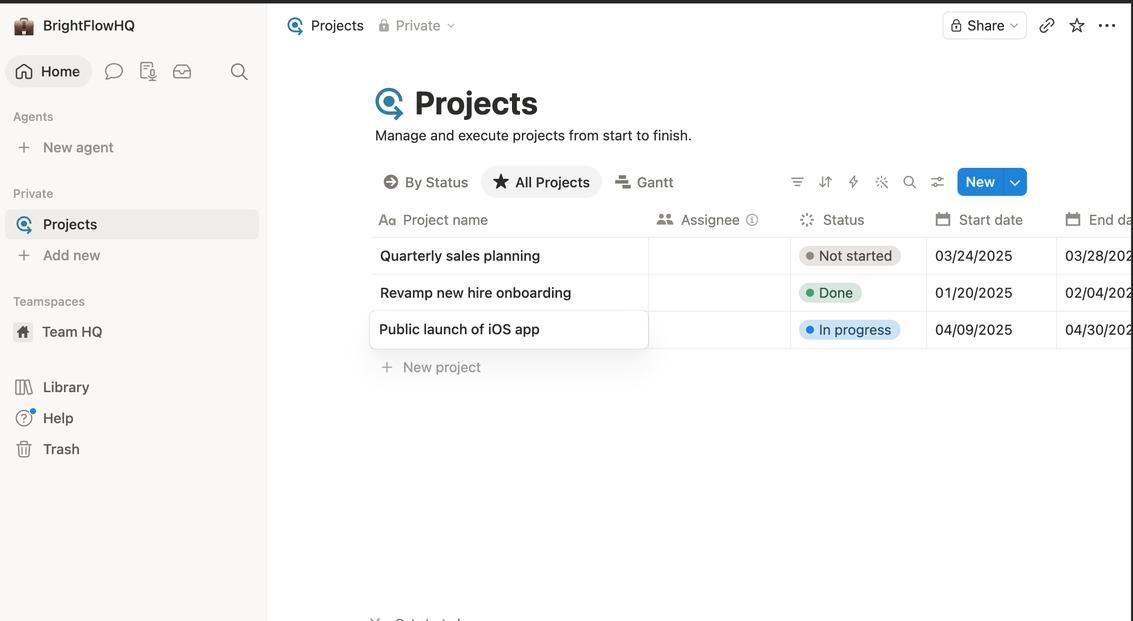
    Notion all-projects table view with status and dates
    The same database as a sortable table, every view type is included on every plan.
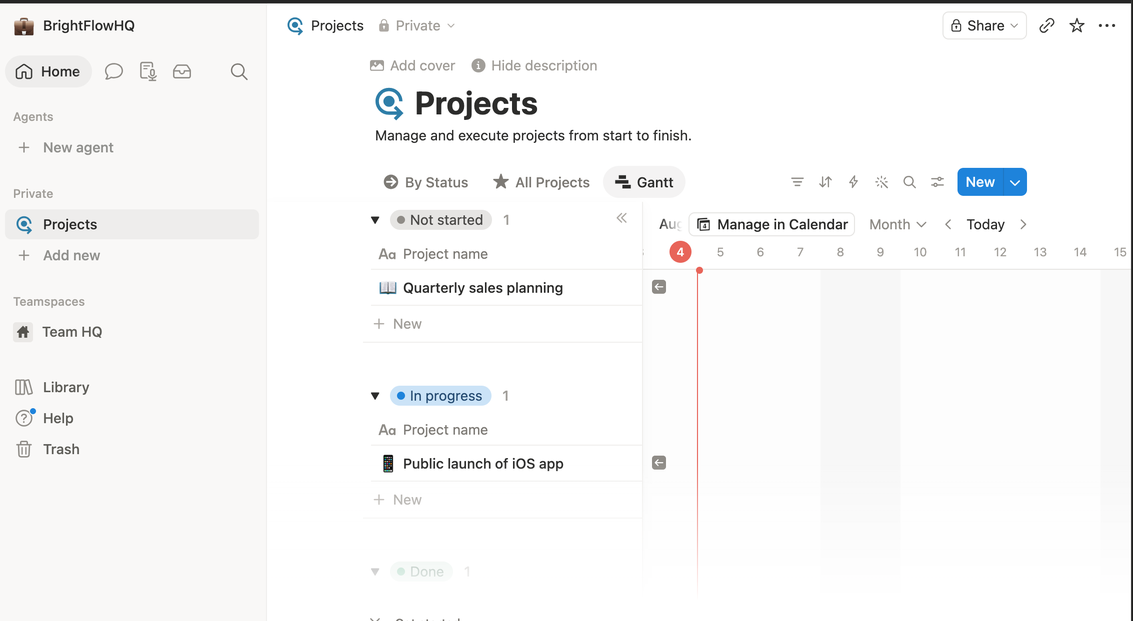
    Notion Gantt timeline view of projects
    Gantt/timeline view ships free too, often a paid add-on elsewhere.

    The risk is the blank-canvas problem. Notion gives you infinite freedom and zero opinion, which means the structure is only as good as the discipline of whoever builds it. Teams without a “Notion person” often end up with a sprawling, half-abandoned workspace.

    Choose Notion if: your work revolves around documents and knowledge, you’re solo or a small team, and someone on the team enjoys building systems.

    Avoid if: you need strict task accountability across many people, or nobody wants to maintain the workspace.

    ClickUp: The Everything Platform

    ClickUp’s pitch is “one app to replace them all,” and it takes that seriously: tasks, docs, goals, whiteboards, time tracking, dashboards, automation, it’s all in there. For operations-heavy teams that genuinely use those capabilities, consolidating tools into one subscription is real money saved.

    The cost is complexity. ClickUp has the steepest learning curve of the three, and its abundance of views, settings, and features can overwhelm teams that just wanted a task list. It rewards power users and punishes casual ones.

    Choose ClickUp if: you’re consolidating multiple tools, you have complex workflows (client ops, agencies, product teams), and you’re willing to invest setup time.

    Avoid if: your team resists complicated software, or your needs are simple enough that most features would sit unused.

    Asana: The Focused Finisher

    Asana does fewer things than the other two, on purpose. It’s a project and task manager with an opinionated, clean design, and that focus is exactly why teams adopt it successfully. Onboarding is fast, the interface stays out of the way, and the question “who’s doing what by when” is always easy to answer.

    The tradeoff is depth. Asana isn’t trying to be your wiki or your document workspace, so most teams pair it with other tools. And at the paid tier it’s the priciest per user of the three.

    Choose Asana if: you want a team actually using the tool within a week, your priority is task clarity and accountability, and you’re fine keeping docs elsewhere.

    Avoid if: you want one tool for everything, or you’re price-sensitive at team scale.

    The Bottom Line

    • Solo freelancer or docs-driven small team → Notion
    • Ops-heavy team consolidating tools, comfortable with complexity → ClickUp
    • Team that needs adoption and accountability fast → Asana

    All three have free tiers worth testing, but test with a real project, not a toy one. The tool that survives contact with your actual Tuesday is the right one.

    FAQ

    Which is easiest to learn: Notion, ClickUp or Asana?

    Asana is generally the most approachable for straightforward task management. Notion is flexible but starts as a blank page you must design. ClickUp packs the most features and has the steepest learning curve.

    Can Notion replace a project management tool?

    For solo work and small teams, often yes, using databases and board views. Larger teams that need dependencies, workload balancing and reporting usually prefer Asana or ClickUp.

    Which is best for a small team?

    Docs and knowledge-heavy teams tend to prefer Notion; teams that want everything in one configurable tool prefer ClickUp; teams that mainly need clear owners and deadlines prefer Asana.